How to Run an AI Visibility Check (Free Method and Paid Tools)
A repeatable way to check whether ChatGPT, Perplexity, and Google AI Overviews name your brand — the free spreadsheet method that takes an afternoon, and when a paid checker earns its cost.
Entities in this article
Most people looking for an “AI visibility checker” want one number: are we showing up in AI answers or not?
You can get a defensible version of that number in an afternoon, with a spreadsheet and no budget. You can also spend several hundred a month on a tool that does it continuously. Both are legitimate — they answer different questions, and it is worth knowing which one you actually have before you buy anything.
This is the free method in full, then an honest account of when paying is the better call.
Before You Check Anything: Write Real Prompts
This is the step that determines whether your result means anything, and it is the step everyone rushes.
Do not use your keyword list. People do not talk to assistants the way they type into Google. “ecommerce seo agency” is a search query. “Which agency should I hire to fix organic traffic on my Shopify store?” is a prompt. They return different brands, and only the second one reflects how buyers actually use these tools.
Do not include your brand name. A prompt containing your brand tests whether the model has heard of you. Visibility is about whether it reaches for you unprompted.
Write 20–30 questions across the buying journey:
- Problem-aware — “Why has my Shopify store’s organic traffic dropped?”
- Solution-aware — “Is it worth hiring an SEO agency or doing it in-house?”
- Vendor-selection — “Which SEO agencies specialise in DTC brands?”
- Comparison — “What should I look for when choosing an eCommerce SEO agency?”
Vendor-selection prompts are where commercial visibility lives. Weight your set toward them.
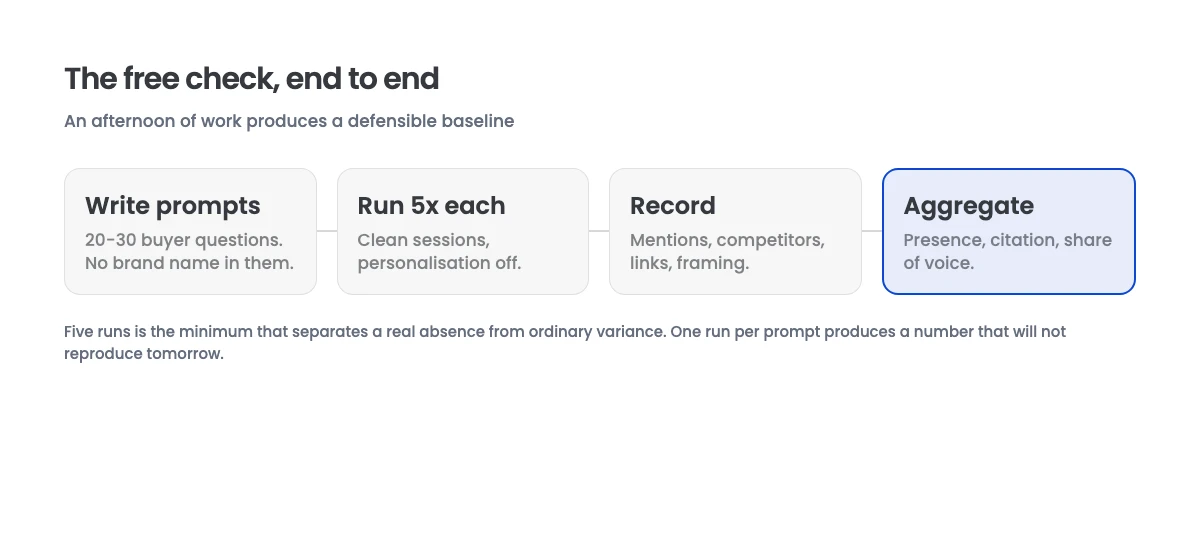
The Free Method
Step 1: Build the Sheet
One row per prompt × assistant × run. Columns: prompt, assistant, run number, brand mentioned (yes/no), competitors named, link to your site (yes/no), and a short note on how you were framed.
Step 2: Run Each Prompt Five Times
Five is the minimum that separates signal from noise. These systems are not deterministic — the same question can name you three times out of five and skip you twice, and a single run would have told you either “we’re visible” or “we’re invisible” with equal confidence and equal wrongness.
Use a fresh chat each time. An assistant that has already discussed your brand earlier in a conversation is contaminated for every subsequent question.
Cover the assistants your market actually uses. For most B2B and eCommerce brands in 2026 that means ChatGPT, Perplexity, and Google AI Mode. Add Claude or Gemini if your buyers use them.
Step 3: Turn Off Personalisation Where You Can
Memory and chat history skew results toward things you have discussed. Use a logged-out session, a temporary chat, or a clean profile. This matters more than people expect — your own account is the single most biased place to measure your own brand.
Step 4: Record Competitors, Not Just Yourself
This is the half that makes the exercise worth doing. Your presence rate in isolation is close to meaningless. A 30% rate is strong if the category leader sits at 35% and dismal if it sits at 90%.
The competitor names the model reaches for are also, directly, your content brief — they tell you whose coverage the system trusts on that question.
Step 5: Calculate Three Numbers
- Presence rate — mentions ÷ total runs
- Citation rate — runs linking your site ÷ runs mentioning you
- Share of voice — your mentions ÷ all brand mentions across the set
Record the date and the sample size alongside them. A presence rate without a sample size is not a measurement.
Cost: an afternoon. Output: a defensible baseline.
Reading Your Result
Presence under 10% — you are effectively absent. The cause is almost always coverage: there is no page of yours addressing the questions being asked. Check whether competitors appearing in those answers have dedicated pages for them. They usually do.
Presence 10–40% with low citation — the model knows you but does not treat your site as the source. This is typically a structure problem rather than an authority problem, and it is the most fixable state to be in. See GEO versus SEO for what changes.
Presence above 40% — you are in the conversation. The work shifts to framing: how you are described, and whether that description came from a third-party page you could improve.
Presence high but only on branded prompts — you have recall, not visibility. Re-check that no prompt in your set contains your brand name.
When a Paid Checker Earns Its Cost
The free method gives you a point-in-time snapshot. Paid tools give you a time series, and that is a genuinely different product.
Pay when:
- You need trend data. Manually re-running 30 prompts × 5 runs × 3 assistants every week is 450 queries. That is nobody’s good week.
- You are proving the work. Reporting to a client or a board needs consistent methodology over months, not a spreadsheet someone rebuilt differently in March.
- You need competitor tracking at scale. Watching six competitors across a large prompt set by hand does not survive contact with a real workload.
- You need alerting. Knowing within days that you dropped out of a high-value prompt is worth real money.
Do not pay when you have not yet run the free version. Buying a dashboard before you know which prompts matter means paying to track the wrong questions precisely. Almost every disappointing tool purchase in this category traces back to that.
We compared what the main tools actually surface — and where each one is weak — in the guide to AI search visibility tools.
Three Things That Will Skew Your Result
Checking too few times. One run per prompt produces a number that will not reproduce tomorrow. This is the most common error by a distance.
Checking from your own logged-in account. Personalisation is doing more work than you think.
Treating a single check as a trend. Presence rates move several points week to week for reasons unrelated to anything you did. One measurement is a baseline, not a direction. Two measurements a week apart are still not a direction.
What to Do With the Baseline
A number on its own changes nothing. The sequence that follows a first check:
- List every prompt where competitors appear and you do not. That is your coverage gap, in priority order, ranked by how commercial the prompt is.
- Fix factual inconsistencies across your site, feed, and third-party profiles. Cheap, fast, and it removes a specific reason models have to skip you.
- Restructure your highest-value existing pages so claims are extractable, before writing anything new.
- Re-measure in four weeks, same prompts, same sample size.
Steps two and three cost far less than a content programme and typically move first. Most teams invert this and commission twenty new articles before they know which questions matter.
If you would rather have the baseline built for you — real prompt set, competitor benchmarking, and a prioritised gap list instead of a score — that is exactly where our AI search optimization work starts. Book a free strategy call and we will walk you through where you currently stand.