Product Feed Optimization: The Attributes That Decide Whether You Get Shown
Your product feed is now read by Google Shopping and by AI shopping assistants. A practical guide to title construction, attribute completeness, and the custom labels most retailers never use.
Entities in this article
Most retailers treat the product feed as plumbing. It gets set up once during the Merchant Center connection, it passes validation, and nobody looks at it again until something breaks.
That was defensible when the feed only fed Shopping ads. It is not defensible now. The same structured product data is being read by Google Shopping, by Google’s AI-driven shopping surfaces, and by conversational assistants that answer product questions directly. A feed that merely validates is a feed that competes on price alone, because it has given the system nothing else to match on.
This article is about the specific attributes that determine whether your products get shown, in what context, and against which competitors. It assumes you already have a working feed. If you are earlier than that, start with what a product data feed is and the Merchant Center fundamentals.
The Title Is Most of the Job
If you optimise one attribute, optimise the title. It carries more matching weight than anything else in the feed, and it is the attribute most retailers leave as their raw product name.
The problem with raw product names is that they are written for someone already on your site, who has the category, the brand, and the context from the page around them. A feed title has none of that context. It has to carry it.
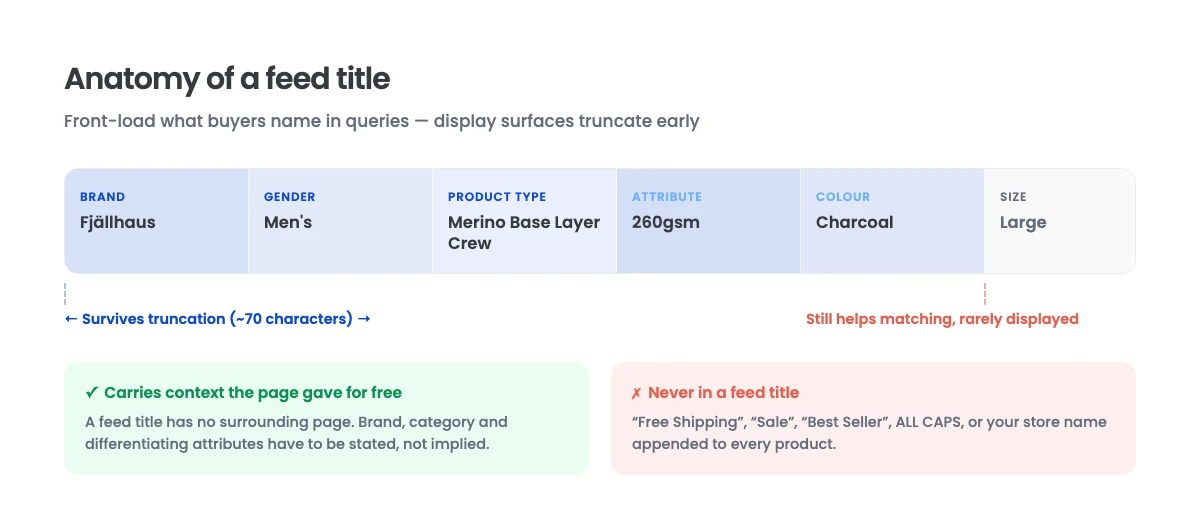
Structure Titles by Category
There is no single correct title formula, because what a buyer specifies differs by category. What works is a consistent per-category template built from the attributes buyers actually name in queries.
For apparel, buyers specify gender, product type, colour, and size, so a workable pattern is Brand + Gender + Product Type + Attribute + Colour + Size.
For hardware and appliances, buyers specify model numbers and capacities, so Brand + Model + Product Type + Key Specification performs better.
For consumables, quantity and format matter, so Brand + Product Type + Variant + Quantity fits.
The consistent principle is front-loading. Titles are truncated in most display contexts, and the leading portion carries the most weight. Put the brand and the product type first, then the attributes that differentiate, then the ones that merely describe.
What to Leave Out
Promotional language does not belong in a feed title. “Free Shipping”, “Sale”, “Best Seller”, and all-caps text are grounds for disapproval and, where they survive, they consume characters that could have carried a matchable attribute.
The same applies to your store name appended to every title. It adds nothing to matching and it costs you leading characters.
Watch the Length
Titles have a generous hard limit but a much shorter practical one, because display surfaces truncate well before that limit. Write so the essential identifying information survives truncation at roughly seventy characters, and use the remaining space for secondary attributes that help matching even when not displayed.
Attribute Completeness Is the Second Lever
Every attribute you supply is another dimension the system can match a query against. Every one you omit is a filter you cannot appear in.
Product Identifiers
gtin is the strongest identifier you can provide. When a buyer searches a specific product, the GTIN is how the system knows with certainty that your listing is that product. Missing GTINs on products that have them is a common and costly omission.
Where a product genuinely has no GTIN, supply brand and mpn, and set identifier_exists to false only when the product truly has no identifiers, such as custom or handmade goods. Setting it to false to avoid populating GTINs you do have is self-defeating.
Category Assignment
google_product_category places your product in Google’s taxonomy. Assigning it explicitly, at the deepest accurate level, outperforms letting it be inferred. Inference is imprecise on ambiguous products, and a miscategorised product competes in the wrong set.
product_type is your own taxonomy and is free-form. Use your real site hierarchy here, because it becomes a useful segmentation dimension later.
Availability and Price Accuracy
These must match your landing page exactly. A mismatch between feed price and page price is one of the most common disapproval causes, and it damages trust signals in the surfaces that read both.
If you run frequent promotions, make sure your feed refresh cadence keeps up. A feed updated daily against prices that change hourly will be wrong most of the time.
Images
Image quality has a direct effect on click-through and, increasingly, on whether a product is surfaced in visual and multimodal discovery contexts.
Use a clean product shot on a plain background as image_link, supply genuine alternates through additional_image_link, and keep promotional overlays, watermarks, and borders out of the primary image entirely. Overlays are a disapproval cause and they degrade performance where they do get through.
Variant Grouping
item_group_id ties variants of the same product together so the system understands that six colourways are one product, not six competing listings. Without it, your variants compete against each other and your reporting fragments.
Custom Labels: The Lever Almost Nobody Pulls
You get five custom label fields. They do nothing for matching. They are for segmentation, and they are the difference between a feed you can manage and a feed you cannot.
The point is to encode business dimensions the feed does not otherwise carry, so you can act on them in bidding and reporting. Useful dimensions include:
- Margin band. High, medium, low. You almost certainly want to bid differently on a 60% margin product than a 12% one, and nothing else in the feed tells you which is which.
- Inventory depth. Products with thin stock should not receive aggressive spend.
- Seasonality. Lets you shift budget without restructuring campaigns.
- Performance tier. Based on your own historical conversion data, not Google’s.
- Price competitiveness. Whether you are at, above, or below market on that item.
Populate these from your own systems as part of feed generation rather than maintaining them by hand. Hand-maintained labels go stale within a quarter and then actively mislead.
Supplemental Feeds Are the Practical Implementation Path
Most retailers cannot easily change their primary feed, because it is generated by a platform or an app they do not control.
Supplemental feeds solve this. They join to the primary feed on id and override or add specific attributes. In practice this means you can fix titles, add custom labels, correct categories, and patch missing GTINs without touching the primary generation logic at all.
This is the difference between “we would need a development cycle to change our titles” and “we can test a new title structure this week.”
What Changes With AI Shopping Surfaces
The feed is no longer read only by an ads auction. Conversational shopping assistants answer questions like “a waterproof jacket under £150 that packs down small” by reasoning over structured product data.
Two consequences follow.
Descriptive attributes matter more than they did. A query about packability is answered from specification data, not from a keyword match on a title. Attributes like material, dimensions, weight, and capacity, which were previously optional nice-to-haves, are now what allow a product to be surfaced in an attribute-specific query. Populate product_detail attributes properly where your category supports them.
Consistency across surfaces became a ranking factor. These systems read your feed and your product page. When they disagree, the system has a reason to distrust both. Feed-to-page consistency is no longer just a disapproval avoidance measure. We covered the broader version of this problem in GEO versus SEO, and it applies with particular force here, because the feed is the most machine-readable claim you make about your products.
The strategic framing is in ChatGPT Shopping and the future of discovery.
A Practical Audit Sequence
If you are picking this up on an existing feed, work in this order.
- Pull your disapproval and warning report. Fix hard disapprovals first, then warnings. Warnings are frequently missing identifiers, which is exactly the completeness problem above.
- Sample twenty titles across your top revenue products and compare them against the query patterns those products should match. This will usually be the largest single gap.
- Check identifier coverage. What percentage of products that should have a GTIN actually carry one?
- Check category assignment depth. How many products sit at a shallow or default category?
- Verify feed-to-page consistency on price and availability for a sample, at a moment when a promotion is running. That is when mismatches surface.
- Build custom labels from your margin and inventory data.
- Set up a supplemental feed as your ongoing mechanism for all of the above.
The Short Version
Feed optimisation is not a one-time setup task, and validation is not the same as optimisation. A feed that passes every check can still be leaving most of its potential unrealised, because passing checks only proves the data is well-formed, not that it is complete or well-constructed.
Titles carry most of the matching weight. Attribute completeness determines which queries you are eligible for at all. Custom labels are what make the whole thing manageable. And consistency with your product pages is now a credibility signal to systems that read both.
If you want a read on what your current feed is costing you, in disapprovals, in missing eligibility, and in queries you are not matching, that is a concrete piece of analysis we can run. Book a free strategy call and we will show you what we find.