The Shopify SEO Checklist: 24 Checks That Actually Move Revenue
A Shopify-specific SEO checklist ordered by revenue impact, covering the duplicate URL paths, faceted navigation traps, and collection-page gaps that generic checklists miss.
Entities in this article
Most Shopify SEO checklists are general eCommerce checklists with the word Shopify added. They tell you to write unique meta descriptions and compress your images, which is true and which is not where Shopify stores actually lose traffic.
Shopify has a specific, opinionated URL architecture that you cannot fully change. That architecture creates a small number of predictable problems, and those problems account for a disproportionate share of the organic revenue left on the table across the platform. This checklist is ordered by how much revenue each item typically moves, starting with the structural issues nobody mentions.
Work top to bottom. The first six items are worth more than the remaining eighteen combined on most stores.
Part One: The Structural Issues (Highest Impact)
1. Confirm Your Product Canonicals Point to /products/
Shopify serves every product at two paths. The clean one, yourstore.com/products/handle, and the collection-scoped one, yourstore.com/collections/collection-name/products/handle. A product in six collections is reachable at seven URLs.
Well-built themes emit a canonical tag pointing at the clean /products/ path from every variant of that URL. Many themes, particularly heavily customised ones and older ones, do not.
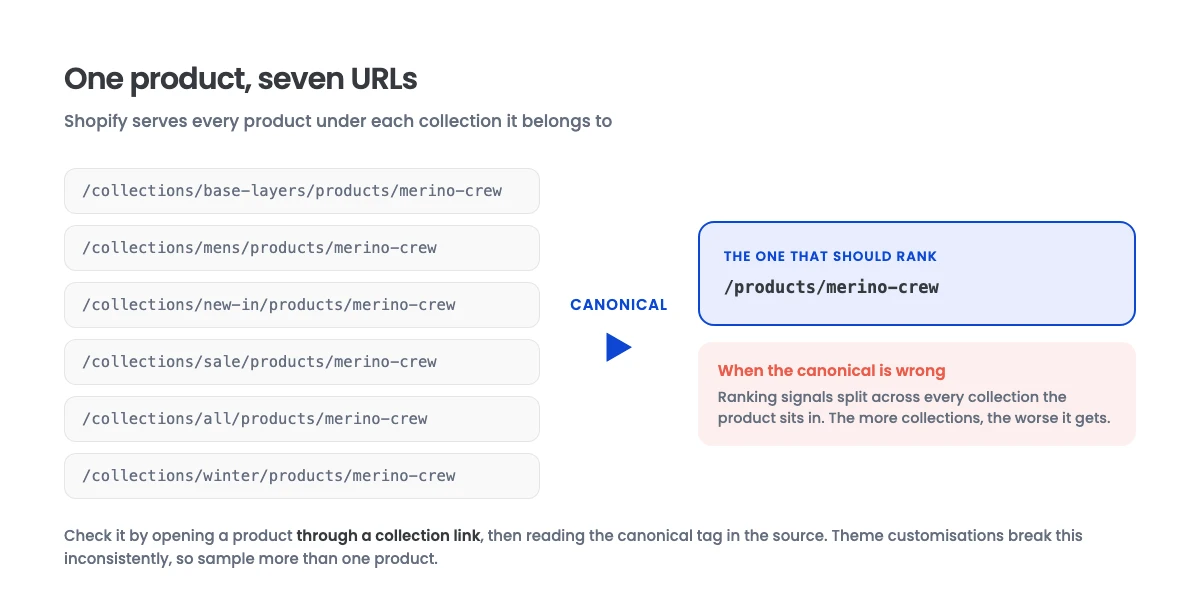
How to check: open a product through a collection link, view source, find the canonical tag, and confirm it points at /products/handle and not at the collection-scoped URL you are currently on. Repeat on two or three products, because theme customisations are sometimes inconsistent.
Why it matters: when this is wrong, every product’s ranking signals are split across as many URLs as it has collection memberships. This is the single most common structural defect on the platform.
2. Fix Collection Page Content Depth
Collection pages are where commercial intent concentrates. “Merino wool base layers” is a collection query, not a product query, and it is worth more than most individual product terms.
Shopify’s default collection template renders a title and a product grid. That is thin, and it competes against retailers who treat collection pages as real landing pages.
The fix: substantive content on your commercially important collections. A genuine introduction that answers what the buyer is deciding between, buying guidance, and an FAQ block. Place the bulk of it below the product grid so it does not push products down the page.
Do not do this for every collection. Do it for the ten to twenty that carry real search demand. Our full treatment of this is in category page SEO.
3. Control Faceted Navigation Indexation
Shopify’s Search & Discovery filters generate URLs with filter. parameters. Every combination of filters your customers can apply is a crawlable URL.
Left uncontrolled, a store with five filters and a handful of values each can generate tens of thousands of URLs from a few hundred real pages. Crawl budget goes to filter permutations instead of products.
The fix: filtered views should generally be canonicalised to the unfiltered collection. The exception is filter combinations with genuine independent search demand, where a dedicated, properly built collection is a better answer than an indexed filter URL.
How to check: in Google Search Console, look at Pages and check the discovered-not-indexed and crawled-not-indexed counts. If they are large relative to your real page count, faceted URLs are usually the cause.
4. Audit Your Redirects After Every Handle Change
Shopify generates a product’s handle from its title at creation and then keeps it. Editing a product title does not change the handle, which is good. But manually editing a handle silently breaks the old URL unless you create a redirect.
Shopify’s admin will offer to create the redirect when you change a handle. It is easy to dismiss.
How to check: Online Store, Navigation, URL Redirects. Then crawl your site and check for internal links pointing at 404s. Every broken internal link is wasted crawl and wasted equity.
5. Get Product Schema Right
Most Shopify themes ship Product structured data. Many ship it with gaps: missing GTIN, missing brand, missing availability, or price formatting that does not validate.
How to check: run key product URLs through Google’s Rich Results Test. Check for name, image, description, sku, brand, offers with price, priceCurrency, and availability, plus aggregateRating and review where you genuinely have them.
Do not fabricate review data. Marking up reviews you do not have is a manual action risk, and it is one of the more commonly penalised patterns.
Schema does double duty now. It drives rich results in classic search, and it gives generative systems unambiguous facts to cite. That second role is covered in GEO versus SEO.
6. Match Your Feed to Your Site
Your Merchant Center feed and your product pages must agree on price, availability, title, and specifications. Disagreement causes feed disapprovals, and it undermines your credibility as a source for AI shopping surfaces that read both.
This is a large enough topic that we gave it its own article: product feed optimization.
Part Two: Content and Architecture
7. Write Collection Meta Titles for the Query, Not the Catalogue
Shopify defaults a collection’s title tag to the collection name plus store name. “Base Layers – YourStore” does not match how anyone searches. “Merino Wool Base Layers for Men | YourStore” does.
8. Eliminate Duplicate Product Descriptions
Manufacturer-supplied descriptions used verbatim appear identically on every retailer selling that product. You are competing for a term with content that is character-for-character identical to fifty competitors.
Rewriting descriptions for your top revenue products is one of the highest-return content tasks available to a Shopify store, and it is almost always deferred.
9. Build a Real Internal Link Graph
Shopify gives you navigation and collection membership. It does not give you contextual internal links.
Add links from your blog content to relevant collections and products with descriptive anchor text. Add related-product and related-collection modules. Products reachable only through paginated collection grids get crawled less often and rank worse.
10. Handle Pagination Deliberately
Collection pages paginate at ?page=2. Each paginated page should self-canonicalise rather than canonicalising to page one, which would hide deep products from discovery entirely.
Check that paginated URLs are reachable as real links rather than only through JavaScript-driven infinite scroll, which crawlers may not traverse.
11. Prune or Consolidate Dead Products
Discontinued products accumulate. A store with 400 live products and 900 permanently out-of-stock ones has a quality and crawl problem.
For permanently discontinued items, 301 redirect to the closest live product or the parent collection. For seasonal items returning later, keep the page live and mark availability honestly.
12. Fix Thin Tag and Vendor Pages
Shopify auto-generates pages at /collections/all/tag and vendor pages. These are frequently thin duplicates of real collections. Review what is indexed and canonicalise or noindex the ones that duplicate a proper collection.
Part Three: Technical Hygiene
13. Check Your robots.txt.liquid
Shopify allows editing robots.txt through robots.txt.liquid in the theme. The default is sensible for most stores. If someone has customised it, verify nothing important is blocked. Blocking /collections/ entirely is a mistake we have seen more than once.
14. Verify the Sitemap Is Clean
Shopify generates /sitemap.xml automatically. Confirm it is submitted in Search Console and that the URL counts roughly match your real page counts. A large gap indicates something is being excluded unexpectedly.
15. Compress and Correctly Size Images
Product photography is usually the heaviest asset on a Shopify page. Serve appropriately sized images through Shopify’s image transformation parameters rather than shipping full-resolution files and scaling in CSS.
16. Write Descriptive Image Alt Text
Alt text on product images should describe the product specifically. This is accessibility work first and image search work second, and image search is a meaningful channel in visual categories.
17. Audit Third-Party App Script Load
Every app injects scripts. Stores accumulate apps they no longer use whose scripts still load on every page. Audit installed apps, remove what is unused, and confirm leftover script tags are gone from the theme.
18. Confirm Mobile Rendering
Check that content below the product grid actually renders on mobile rather than being hidden by a theme breakpoint, and that your structured data is present in the mobile render.
19. Check hreflang If You Use Shopify Markets
Multi-market stores need correct hreflang annotations across market URLs. Errors here cause the wrong market’s page to rank in the wrong country, which converts poorly.
Part Four: Measurement and Maintenance
20. Separate Branded From Non-Branded in Reporting
Branded search grows with paid spend and general awareness. Mixing it into your organic reporting will tell you SEO is working when it is not, or the reverse.
21. Track Collection Pages Separately From Products
They behave differently, respond to different work, and have different conversion profiles. Averaging them hides which half of your programme is performing.
22. Monitor Search Console Coverage Monthly
Watch the trend, not the absolute number. A rising crawled-not-indexed count is usually the earliest visible symptom of a faceted navigation or duplication problem.
23. Re-Audit After Every Theme Change
Theme updates and customisations routinely break canonicals and structured data. Re-run checks 1 and 5 after any theme deployment. This is the most commonly skipped item on this list and the one that quietly undoes previous work.
24. Keep One Owner for the Checklist
Shopify SEO degrades through accumulated small changes made by people who are not thinking about SEO: a new app, a theme tweak, a bulk product edit. Someone needs to own the periodic re-check.
Where to Start
If you only do three things: verify your product canonicals, control your faceted navigation indexation, and build real content on your top twenty collection pages. On most stores those three account for the majority of recoverable organic revenue.
You can see what that work produced for stores in similar positions in our eCommerce SEO case study and the gift shop build-out.
Want the version of this run against your actual store, with the findings prioritised by revenue rather than by severity label? That is what our eCommerce SEO engagements open with. Book a free strategy call and we will walk you through what we find.